AWS VPC Crash Course
Introduction
In this post, I am going to explain the basic concepts of AWS’s VPC, which includes
- VPC
- Subnets & CIDR Range
- NACL & Security Groups
- Gateways
VPC (Virtual Private Cloud)
I personally think that the VPC is the most important concept you have to know in AWS. Imagine it as a room where you put your servers/services in, such as your DB, EC2 instance, and so on. Just like LAN(Local Area Network), the computers inside the room can freely communicate with each other, and you have to set up your internet connection to the outside world (Gateways). You can set up public and private subnets, and those in private subnets cannot be accesed from the outside world. Please mind that these are metaphors to help you understand, not technical explanation.
It is important to set up your vpc before anything (EC2, ECS, RDS, ELB and so on) since later on, you will be connecting and forwarding your traffics through route53 to your VPC. It is important to place all your resources for your service inside one VPC.
For example, let’s say I want to launch a simple django application using AWS. The general workflow would look something like this.
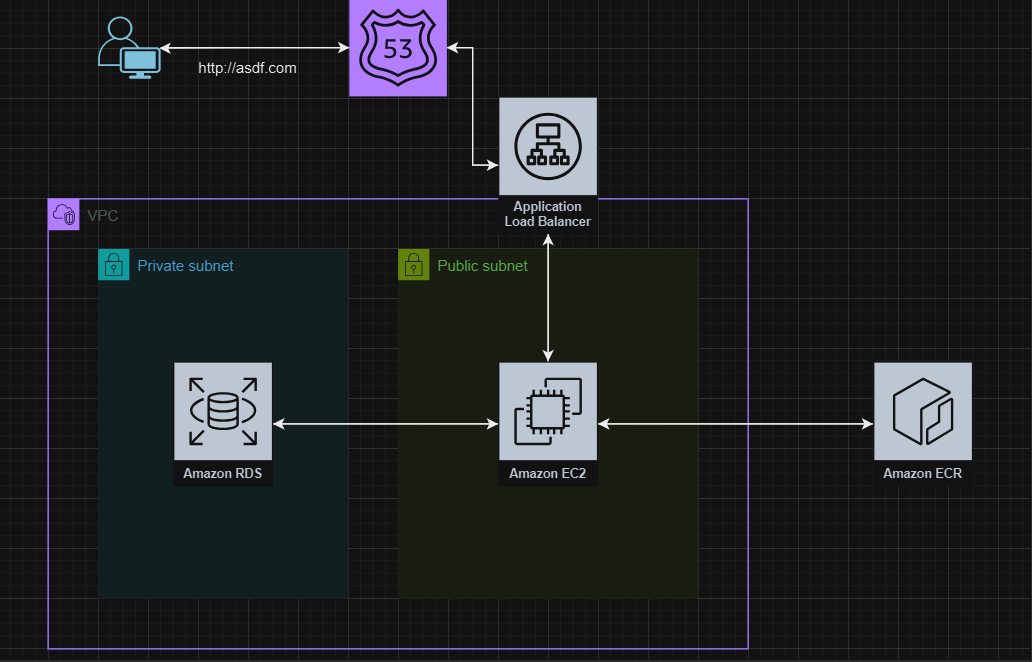
- Set up VPC and SG (Security Group)
- Place my DB, either using RDS or running in EC2, in my private subnet, since I do not want it to be accessible from the outside world
- Configure the DB setting in my Django accordingly for my DB
- Create a docker image for my Django application
- Upload it to ECR
- Lauch using ECS or EC2, which will also be placed in my VPC’s public subnet
- Set up hosted zone in route53
- Create target group for my Django running in VPC
- Create ALB(Application Load Balancer) and connect it to the target group
- Connect ALB to the hosted zone and register domain, SSL certificates
In the example above, my Django application can freely access my DB in private subnet since they are in the same VPC, but anybody outside the VPC can’t make any requests to my DB. I can’t even directly SSH into it from my PC. There are some key concepts of VPC that you should understand. They are Subnets, Gateways and CIDR ranges.
Subnets & CIDR Ranges
Subnets stands for subnetworks. As the name suggests, they are subdivision of a network. As you have seen from the example above, one of the main reasons why we devide the VPC into subnets is to manage their IP addresses and traffics seperately, and also to improve security.
Subnets
Private subnets cannot be accessed from the outside world. It also cannot reach out to the outside world. That is why we have to set up Gateways, which I will talk about later. Public subnets are, literally, public. Instances can access the outside world, and the outside world can access them. However, the only limitations are the Security Groups. Which, again, will be talked about later.
CIDR(Classless Inter-Domain Routing) Ranges
CIDR ranges are basically the range of IP addresses for your hosts in your subnet. When you create your subnets in aws, they will ask for something called an CIDR Range. It typically looks something like this, it’s called an CIDR notation. It tells how many bits are reserved for the network ID, and how many are for hosts.
10.0.0.0/24
So an IP address is made out of 4 digits, each represented by 8 bits, so there are total of 32 bits. The number that comes after the / sign tells us how many digits cannot be changed. Those bits that cannot be changed are called netwrok bits. And those that can be changed, are called host bits.
10.0.0.0/24means you can only change the last digit, so it would look like10.0.0.0 ~ 10.0.0.255so 2^8 total ip addresses you can use
10.0.0.0/16means you can only change the two digit10.0.0.0 ~ 10.0.255.255so 2^16 total ip addresses you can use
10.0.0.0/8means you can change the last three digits10.0.0.0 ~ 10.255.255.255so 2^24 total ip addresses you can use
Subnet Masks
A subnet mask is a four-octet number used to identify the network ID portion of a 32-bit IP address(Shinder, D. in MCSA/MCSE [Exam 70-291] Study Guide , 2003). So basically for the subnet mask, the 255 means they are for network ID, and 0s are for hosts.
- e.x:
10.0.0.0/8->255.0.0.0The255.0.0.0, we call that the subnet mask for the subnet.
Honestly, I’m not an expert in computer networking, at least for now. So many of my explanations could be technically wrong. So please feel free to correct me, either in thread, linked comments, or even via email. Or you can even create an issue in my blog repo or something!
NACL & Security Groups
Now that we have created subnets, we have to manage what kind of traffic can go in and out from our subnets. As I have mentioned several times, we want everything to be able to come in and out in our public subnets, and nothing for our private subnets. the NACL (Network Access Control List) takes care of that. By default, when you create an VPC, a NACL is also created automatically. It consists of two rules, one rule that allows everything in and out for public subnets, and one that allows nothing for private subnets. You can check it in the NACL or Networ ACL tab in your VPC page.
Security groups are firewall for your instances in your VPC. For instance, you may want to open only the http/https inbound traffics for everyone for your EC2 instance running Django. And SSH from only your IP address. Security groups take care of that. You wouldn’t want somebody scanning your ports and trying to infiltrate into your EC2 instance!
Gateways
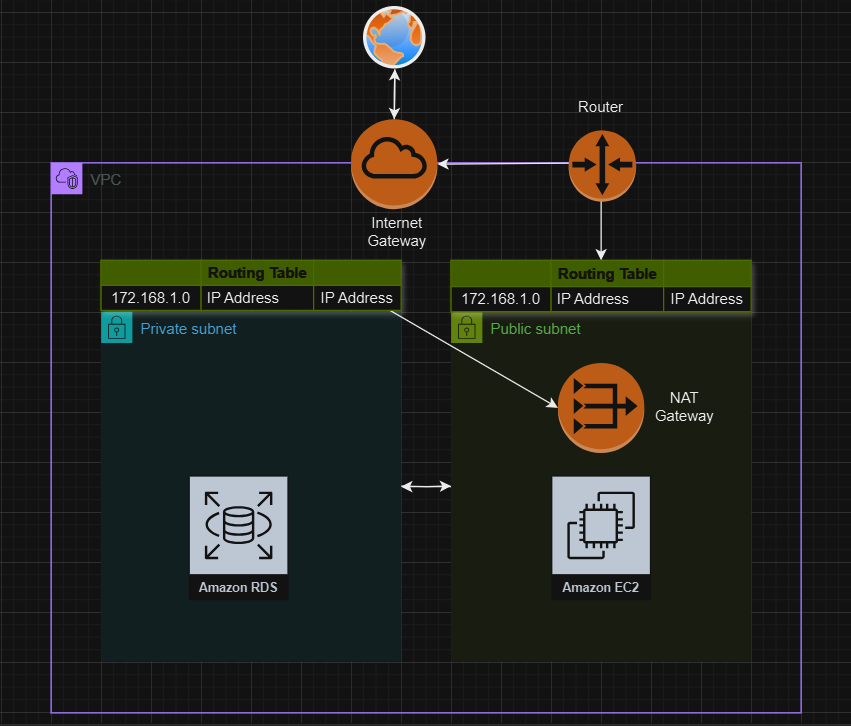 Now we are finally at our last topic, the gateways. I have explained in the beginning of the post, that VPCs are just like your room. You have to set up network connections. This can be done by gateways. There are several types of gateways, but in this post I will only discuss about NAT gateways and internet gateways.
Internet gateways take care of the internet connection. AWS will automatically create one for you if you choose the fast or simple create method. AWS will create an internet gateway, and hook them up to the routing table.
NAT gateways NAT gateways allow the instances in the private subnet to reach out to internet. For instance, you would want your EC2 instance running the postgreSQL DB in private subnet to be able to get updates and fetched from the internet. So you would set up a NAT gateway.
However, NAT gateway only allow outbound traffic, so your DB would be safe from inbound traffic from the world. It is also located inside a public subnet.
This trick of setting up an instance (either a gateway, or literally an EC2 instance) in the public subnet, and using that to connect to the instances in the public subnet is used very often. For example, since you cannot directly SSH into your DB in private instance, you would launch an EC2 instance, SSH into it, then SSH into the DB from the public subnet. Remember this is only possilbe because they are in the same VPC.
Routing Tables
What’s a routing table? It is just a table that records the IP addresses that are to be connected to a gateway, or something. Typically you would have a public and private routing table, plus the main routing table that hooks up the public and the private subnets. The public routing table is hooked up to the internet gateway, while the private table is hooked up to the NAT gateway, if you have one.
Written by
Roger Kim

