Developing with Python
Introduction
In this post, I wanted to share my experience of developing in python. When you’re new to the language, it is hard to figure out how things are supposed to be done in general. So in this post, I will briefly talk about:
- What exactly is python?
- How computers run python codes
- Interpreter vs Compiler
-
Why python is so popular
- How to develop in python
What IS Python?
Python is a high-level, easy-to-read programming language that was created by Guido van Rossum and first released in 1991. It is know for its wide range of usage, which I will discuss later in this post.
What makes Python, Python?
Python is extremely readable, easy to write thanks to dynamic typing, and sometimes slow too! What gives python these characteristics?
Well the first obvious reason would be that it is dynamically typed. Meaning that the computer has to check for the type of each variables, since we didn’t specify it. That sounds like a lot of work, and it does slow down the process.
Another huge reason why python is slow, is beacause it is an interpreted language. Many of the languages that are know to be fast, C, C++, Go, they are compiled languages.
Compilers
Compilers compile the source code we wrote, into machine codes. To be exact, in the case of C++ (.cpp files), the compiler turn it into an assembler file (.s), then the assembler turns it into object code file (.o), then the linker turns it into an executable file (varies, .out, .exe, etc). For example, when you have a .cpp file named “hi.cpp”, and you want to compile it in the linux command line, you would do
g++ hi.cpp
Which gives you a file named “a.out”. Which is a form of output file for executables created by the compilers and linkers. You see that “g++”? That’s a compiler, but notice how it also does the job for the assembler and the linker and just outputs an executable file.
So you have to do an extra step of executing the executable, like this
./a.out
This is the key difference between compilers and interpreters. You don’t need that extra step when executing a .py file. You just need
python a.py
nothing more.
Interpreters
So how is this possible? The answer is in the way interpreters work.
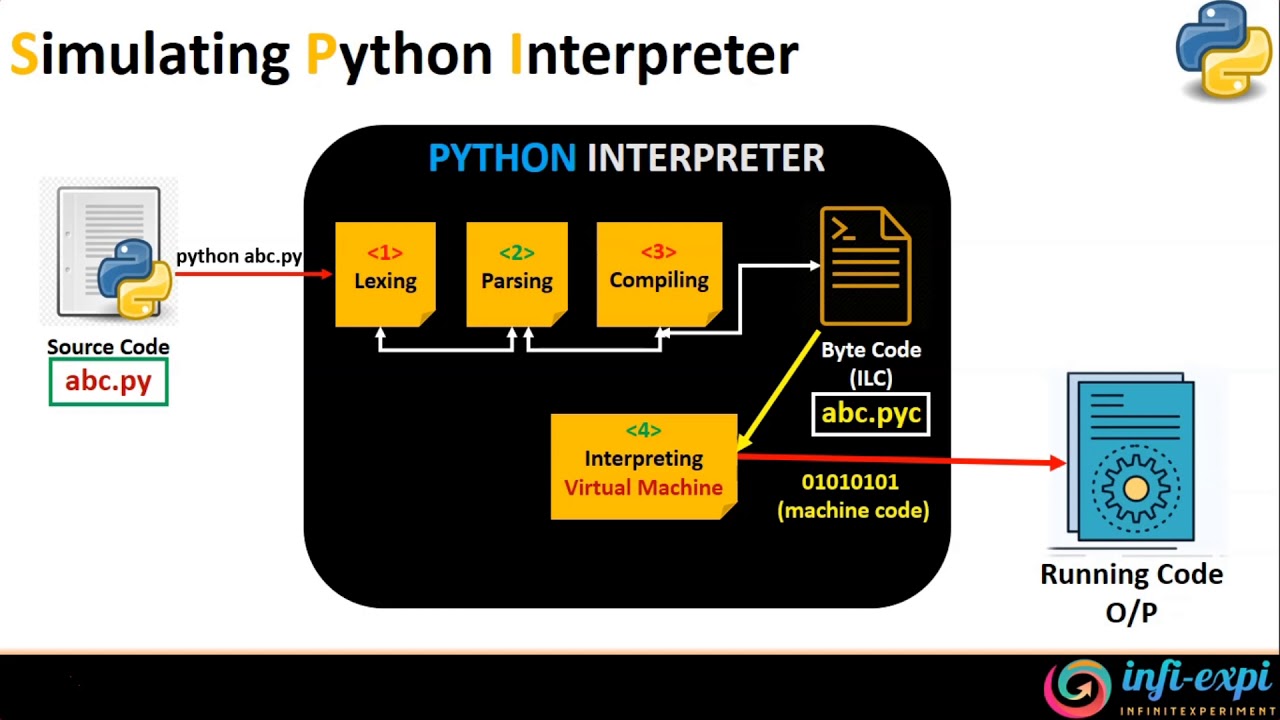
Step 1. Compiling
First, the source code file (.py) is turned into bytecode (e.x: .pyc) through these three main processes;
- lexing
- tokenizing the source code into individual tokens breaks it down into tokens such as keywords, identifiers, operators, etc. These tokens are the basic building blocks of the code. If there is a syntax error, such as a misspelled keyword or an invalid character, the lexical analyzer will detect it and raise a syntax error at this stage
- parsing
- analyzes the tokens to create a parse tree (AST) that represents the hierarchical structure of the code. If there is a syntax error, such as a missing colon in an if statement or an incomplete function definition, the parser will raise a syntax error at this stage.
- Generating (ATS, etc)_.
- Turning what the previous steps generated into actual bytecode.
This whole process is often refered to as compiling.
Step 2. Executing in Virtual Machine
Here’s where the bytecode is executed line by line in a virtual machine. The interpreter will take care of the external libraries you downloaded through pip in this process, just like how linkers linked individual libraries when I was explaining earlier about compilers.
This virtual machine is basically a extra layer between the CPU (or the local machine in general), and the application allows Python for all of its fancy features; like dynamic typing. It also let’s you worry less about the low-level stuff (like manual memory management in C).
Why Python
Python is one of the most popular and used programming language in the world. The reason why it is so popular is, as you may have heard before, beacause it can be used anywhere. Now let me explain in more detail what it means.
Libraries/Frameworks/Packages/Modules
So if you’re completely new to developing/programming, you may not be familiar with the terms above. Those terms (Libraries/Frameworks/Packages/Modules) basically stands for: collections of pre-written code that we use to do something. These are the tools we use to actually build something.
So basically the reason why python is so popular is because it provides you with a wide variety of these Frameworkds/Packages.
For example, if you want to
- Build a website in python
- Django, Flask
- Do/Study/Research Machine Learning and/or Data Science
- Numpy, Pandas,
- TensorFlow, PyTorch
- Matplotlib
- Web Scraping/Crawling (Collecting data from the web)
- Scrapy, BeautifulSoup, Selenium
-
GUI - Tkinter
- Many more…
How Python
Ok, now you get it. Python can do all those things. But how? How do I install/download all those stuff? That’s what pip or Package Installer for Python, is for.
You just have to create a virtualenv within the terminal’s python environment using packages like venv(python’s built in package). Then
pip install name_of_package/framework/whatever
Now if you’re wondering what and why create virtualenv, take a look at this post
So for example, if I want to make an website with python, so I decided to use a web framework called django, all I have to do (primarily of course), is
pip install django
It’s very simple and straightforward (for most of the time, at least). Especially when you’re developing in Linux.
Ok now you installed all the tools you need. But where should I write my code?
If you are into Machine Learning or Data Science, Jupyter Notebook is probably what you should use. It is basically a web application that allows you to look at the data you are manipulating, as you code. It looks something like this.
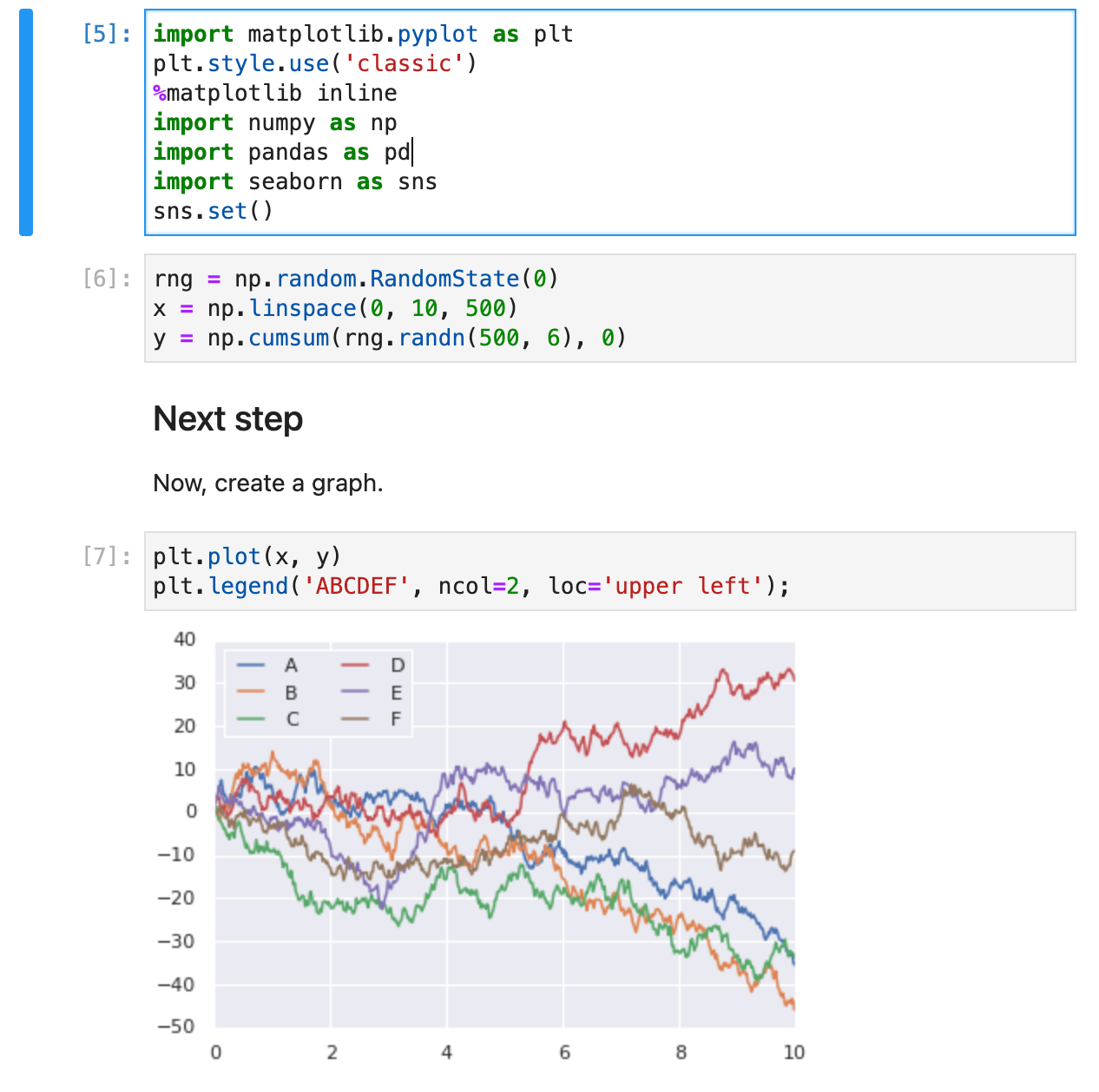
Most other things, web development, web sraping, tkinter(GUI), are done in text-editors, IDEs, and terminal. You basically write a .py file, and the python interpreter does its magic. Speaking of python interpreter…
Conclusion
- Python is interpreted language
- Which allows it to have fancy features (e.x: dynamic typing)
- It has a lot of useful Libraries/Packages
- Which allows it to be used in almost every fields
- Web dev, Data Science, Machine Learning, GUI, Website testing (selenuim), etc
- Use Jupyter Notebook if you want to view your data as you write your code.
Written by
Roger Kim

