Basic IAM features
Abstract
- Policies are basically JSON files that contains which actions should be allowed
- You would attach these policies to user groups, and create users in it
- Roles are basically just like users, but for non-human stuff like tasks, services, etc.
Introduction
Have you ever came across a situation where AWS tells you that you don’t have the right permissions to perform certain actions? I mean, what does it mean by action and what are policies and what are permissions? In this post, I will explain the basics of IAM.
Actions & Policies
Let’s say you want your django application to access your S3 bucket. You would want it to perform certain actions such as uploading, deleting, and retrieving. All of these are called, not surprisingly, actions. And a set of these actions are called policies. You can go to the AmazonS3FullAccess policy, and see the different actions listed in the policy, as shown in the picture below.
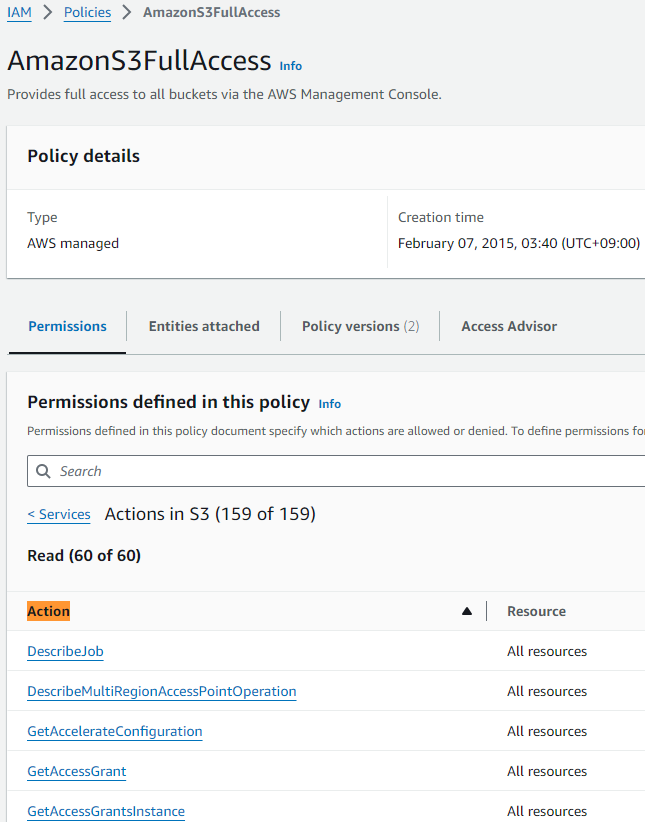
Policies can also be represented by JSON files. Here’s JSON AmazonS3ReadOnlyAccess policy.
{
    "Version": "2012-10-17",
    "Statement": [
        {
            "Effect": "Allow",
            "Action": [
                "s3:Get*",
                "s3:List*",
                "s3:Describe*",
                "s3-object-lambda:Get*",
                "s3-object-lambda:List*"
            ],
            "Resource": "*"
        }
    ]
}
AmazonS3ReadOnlyAccess, JSON
You can see all the actions that this policy is going to allow, in the Action array. This particular policy allows the user or the role to perform all “Get”, “List”, and “Describe” actions on AWS S3 and S3 Object Lambda resources
User Groups & Users
Now you have to decied who gets to do what. In other words, what policies are you going to attach to different *user groups*?
For example, you may create a user group called ‘admin,’ who gets to do everything. And you register all the users, like yourself, your co-worker and so on. You can also create a user group named ‘developers’ which doesn’t have the permissions to create or delete resources.
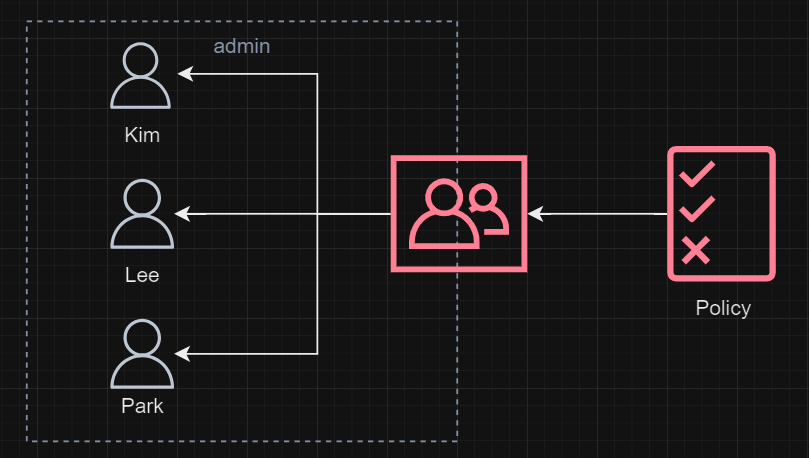
To sum up, you can create a user group and give it certain permissions by attaching policies. In fact, you can go to, if you have one, your user group’s permissions tab to see all the policies attached to it.
Then, you can register, or create users in that user group that you want.
Role
You would also come across the concept of roles and wonder what it is and how it’s different from users. The key difference is that you would assign roles for a non-human object, like a task or a service. Let me explain.
I have explained about ECS here. For those who don’t know, ECS is an AWS container management service. To build containers, ECS would need to retrieve images from ECR, assuming that is where you keep your images.
Now, to perform that action of retrieving image from ECR, you would need to attach some policies to ECS via IAM roles. If you have ever created a ECS task definition, you would have the ecsTaskExecutionRole role, where the AmazonECSTaskExecutionRolePolicy where you can find actions such as BatchGetImage.
{
    "Version": "2012-10-17",
    "Statement": [
        {
            "Effect": "Allow",
            "Action": [
                "ecr:GetAuthorizationToken",
                "ecr:BatchCheckLayerAvailability",
                "ecr:GetDownloadUrlForLayer",
                "ecr:BatchGetImage",
                "logs:CreateLogStream",
                "logs:PutLogEvents"
            ],
            "Resource": "*"
        }
    ]
}
AmazonECSTaskExecutionRolePolicy, JSON
Just like that, you would create and assign roles to tasks and services, not humans.
Written by
Roger Kim

